How to integrate together Provider, Cubit and Bloc on flutter
From simple toggles to complex flows: when Provider, Cubit, and BLoC play together
Provider, Cubit and Bloc are probably the most used and famous state management libraries in Flutter, and you can use all of them based on the type of state you want to manage.
The usage of these three together will help you to cover every case you need to handle. To generalize, you should use Provider for simple state, when complexity increases, you should use Cubit for medium complexity cases and BLoC for complex cases. Just like the difficulty level of the cases you handle, the difficulty of learning, using, and following best practices also increases from Provider to Cubit to BLoC. But generally, in real projects, we should use all three.
We will start with an explanation of what the main use cases are for all three, with some small examples. At the end, we will show you how to use them together in a real case.
Provider
Saying that we use Provider for simple state cases isn't fully correct. Provider is the widget that allows you to inject a single instance of a class into the project and access it through the context. Instead, you should say we use a widget from this library, but for most cases, Cubit and BLoC and other state management libraries provide better implementation and developer experience. However, for the purpose of our guide, I advise you to use ChangeNotifierProvider.
ChangeNotifierProvider and simple state cases
What does 'manage simple state cases' mean? In my opinion, it means managing, using global state logic (which means you can access the same state at various points in your app, independently from the widget tree), a small class with simple logic or variables that contain little data. For example, a boolean flag that indicates whether the user wants dark mode or not. Usually, the variables that are managed with ChangeNotifierProvider are also stored using SharedPreferences logic, because data like app settings or dark mode preferences are information that the app has to remember when it is closed.
Here's an example of how to use ChangeNotifierProvider for handling a variable that represents the user's dark mode preference:
File "darkModeNotifier.dart"
class ThemeManager extends ChangeNotifier {
bool _isDarkMode = false;

bool get isDarkMode => _isDarkMode;

Color get textColor => _isDarkMode ? Colors.white : Colors.black;

Color get containerColor => _isDarkMode ? Colors.grey[800]! : Colors.blue[100]!;

void toggleTheme() {
	_isDarkMode = !_isDarkMode;
	notifyListeners();
	}
}
You should define the ChangeNotifier class in a separate file. Calling notifyListeners() notifies all subscribed widgetsthat the state has changed.
Page one (only read)
class PageOne extends StatelessWidget {
  @override
  Widget build(BuildContext context) {
    return Scaffold(
      appBar: AppBar(title: Text('Page One - Read Only')),
      body: Consumer<ThemeManager>(
        builder: (context, themeManager, child) {
          return Center(
            child: Container(
              padding: EdgeInsets.all(20),
              color: themeManager.containerColor,
              child: Text(
                'Hello from Page One!',
                style: TextStyle(
                  color: themeManager.textColor,
                  fontSize: 18,
                ),
              ),
            ),
          );
        },
      ),
    );
  }
}
Page two (read + write)
class PageTwo extends StatelessWidget {
  @override
  Widget build(BuildContext context) {
    return Scaffold(
      appBar: AppBar(title: Text('Page Two - Can Toggle')),
      body: Consumer<ThemeManager>(
        builder: (context, themeManager, child) {
          return Center(
            child: Column(
              mainAxisAlignment: MainAxisAlignment.center,
              children: [
                Container(
                  padding: EdgeInsets.all(20),
                  color: themeManager.containerColor,
                  child: Text(
                    'Hello from Page Two!',
                    style: TextStyle(
                      color: themeManager.textColor,
                      fontSize: 18,
                    ),
                  ),
                ),
                SizedBox(height: 20),
                ElevatedButton(
                  onPressed: themeManager.toggleTheme,
                  child: Text(
                    themeManager.isDarkMode
                        ? 'Switch to Light Mode'
                        : 'Switch to Dark Mode',
                  ),
                ),
              ],
            ),
          );
        },
      ),
    );
  }
}
Another important use of ChangeNotifierProvider is managing form state - for example, the data from registration form fields. For example, if users need to enter registration data across two or more different pages, ChangeNotifierProvider can store that data even as users navigate between pages.
More generally, you should use ChangeNotifierProvider to store a single, small instance of a class that you'll need at different points in your app logic. For example, main user data (ID and username) - if you have a backend where you make POST HTTP calls, you probably need to specify the current user's ID in the request body. With this class, you can access this data through the context.
This last case, like the others, you can also handle with Cubit, BLoC, or other state management libraries, but with more verbose code and more complex libraries to learn. However, when you need to manage more complex states and your application logic becomes more complex, Provider is not sufficient. For this reason, various state management libraries were born in the past, but in my opinion, a combination of Cubit and BLoC will help cover every case you need.
Cubit
Cubit is a state management library based on BLoC, but it requires less code and provides a better developer experience - it's much easier to use. That's why I'm covering this first. If you want to learn more about using Cubit and best practices, you can find a detailed article on my blog.
Cubit is perfect for one of the most common scenarios: handling HTTP calls. Using Cubit, you can easily map the different states of an HTTP call to an external API or service: initial, loading, success, and error.
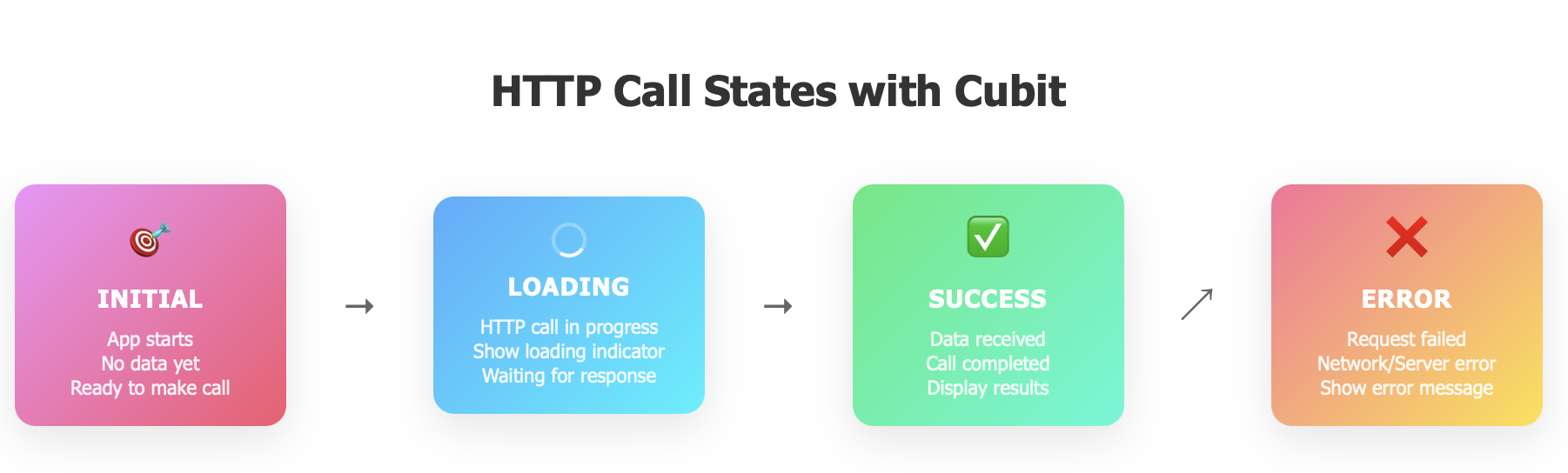
With just a few lines of code, you can manage HTTP call logic. While you can achieve the same with BLoC, it requires significantly more code.